

Voximplant has added Secrets, a dedicated credential store for API keys, tokens, and other sensitive values that VoxEngine scenarios need at runtime. Secrets are managed in the portal and retrieved from code with a single call, replacing the common practice of hardcoding keys into scenarios or repurposing Application Storage.
Modern Voximplant scenarios authenticate against a long list of third-party services: Voice AI providers, STT and TTS vendors, CRMs, payment systems, and more. Secrets gives each of those credentials the right home — dedicated storage, portal-based management, programmatic control, and a clean separation from your scenario code.
Highlights
- Dedicated storage for credentials, separate from Application Storage (which is best kept for session and state data)
- Up to 8,192 bytes per secret — large enough for bulky credentials like GCP's
credentials.json - Single-call retrieval from any scenario:
VoxEngine.getSecretValue("NAME") - Manage interactively from the Voximplant portal, or programmatically from your CI/CD pipeline via the Management API
- Control access to secrets via sub-user and service account roles so they cannot be accessed by unauthorized individuals
Developer notes
Secret values can be viewed and set from inside manage.voximplant.com from the left panel or via the Management API.
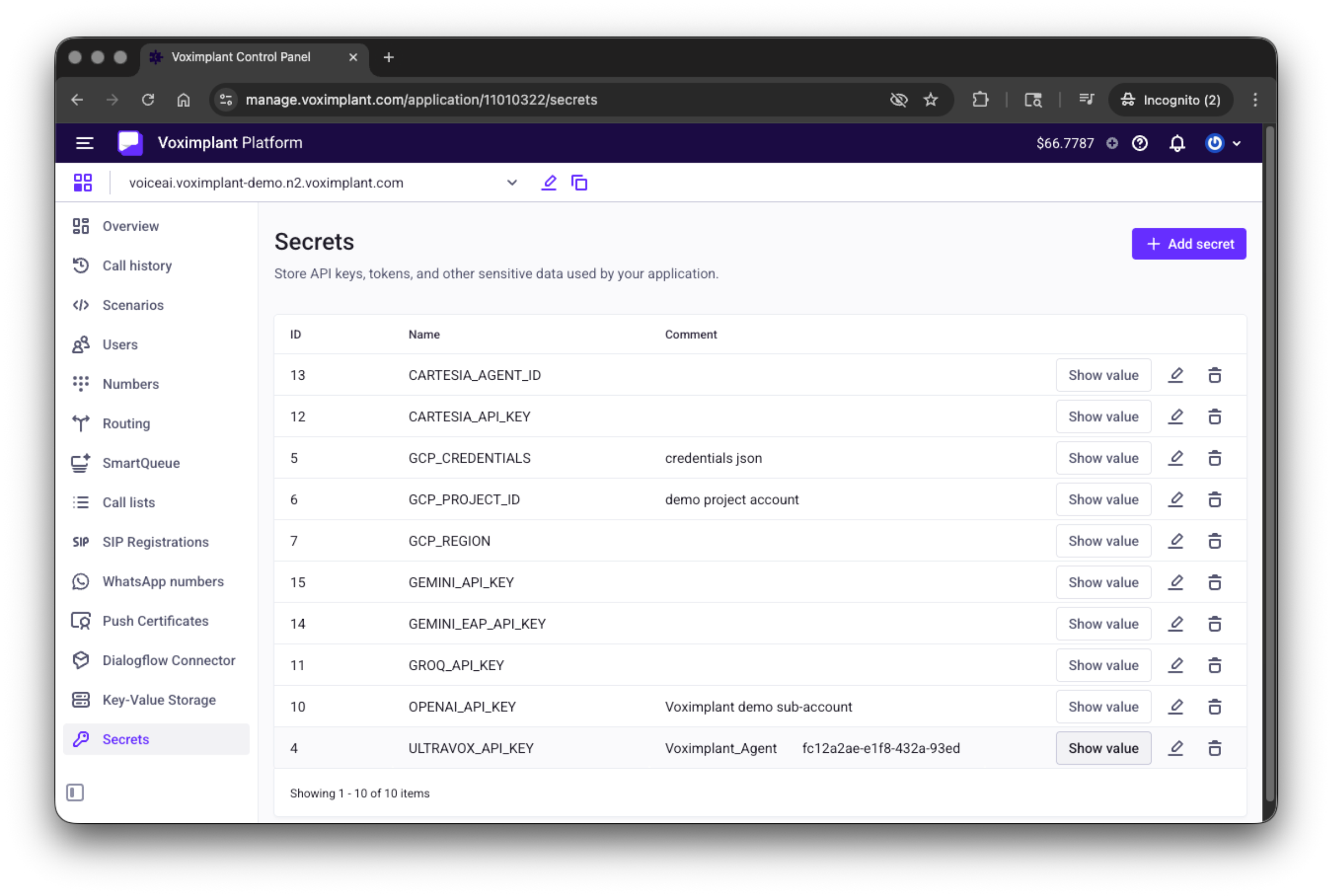
Secret values are capped at 8,192 characters and returned as strings at call time. Retrieval happens inside your VoxEngine scenario with a simple VoxEngine.getSecretValue(SECRET_NAME), so there's no separate credential-fetching step to wire up in your code. To rotate a secret, update the value in the portal or via the Management API — new calls pick up the new value immediately, without redeploying scenarios.
Secret management is role-gated: only users in the Administrator, Owner, or Developer role can create, read, or modify secrets through the portal and Management API. Users in other roles cannot view secret values, which makes Secrets a compliant home for credentials on multi-user accounts.
Quick start: calling a Voice AI provider with a stored key
The example below starts an Ultravox Voice AI session and authenticates with an API key stored as the Voximplant Secret - i.e.:`OPENAI_API_KEY`. No key material lives in the scenario file itself.
require(Modules.OpenAI);

VoxEngine.addEventListener(AppEvents.CallAlerting, async (e) => {
  const voiceAIClient = await OpenAI.createRealtimeAPIClient({
    authorizations: {
      "Authorization": `Bearer ${VoxEngine.getSecretValue("OPENAI_API_KEY")}`,
    },
    body: AGENT_CONFIG,
    onWebSocketClose: handleClose,
  });

  // ...connect the inbound call to the agent
});
This example is intentionally streamlined to focus on Secrets retrieval and is not intended for direct production use.
Pricing and availability
Secrets is generally available today across all Voximplant regions at no additional cost. Manage secrets from the Voximplant portal or programmatically via the Management API, and retrieve them from any VoxEngine scenario.
Resources
- Secrets guide
- VoxEngine.getSecretValue reference
- Secrets Management API reference
- Subusers and Service Accounts