


Outbound campaign statistics ᴺᴱᵂ
Contents
Section purpose
The Outbound campaign statistics section is intended for viewing performance metrics of outbound campaigns ᴺᴱᵂ.
The section shows statistics for the selected period and current campaign state metrics for two campaign types:
Use this section to quickly evaluate campaign status, the number of uploaded and completed contacts, call attempt results, conversation time, and other metrics.
To open the section, in the left menu, select Reporting > Outbound campaigns.
Viewing statistics
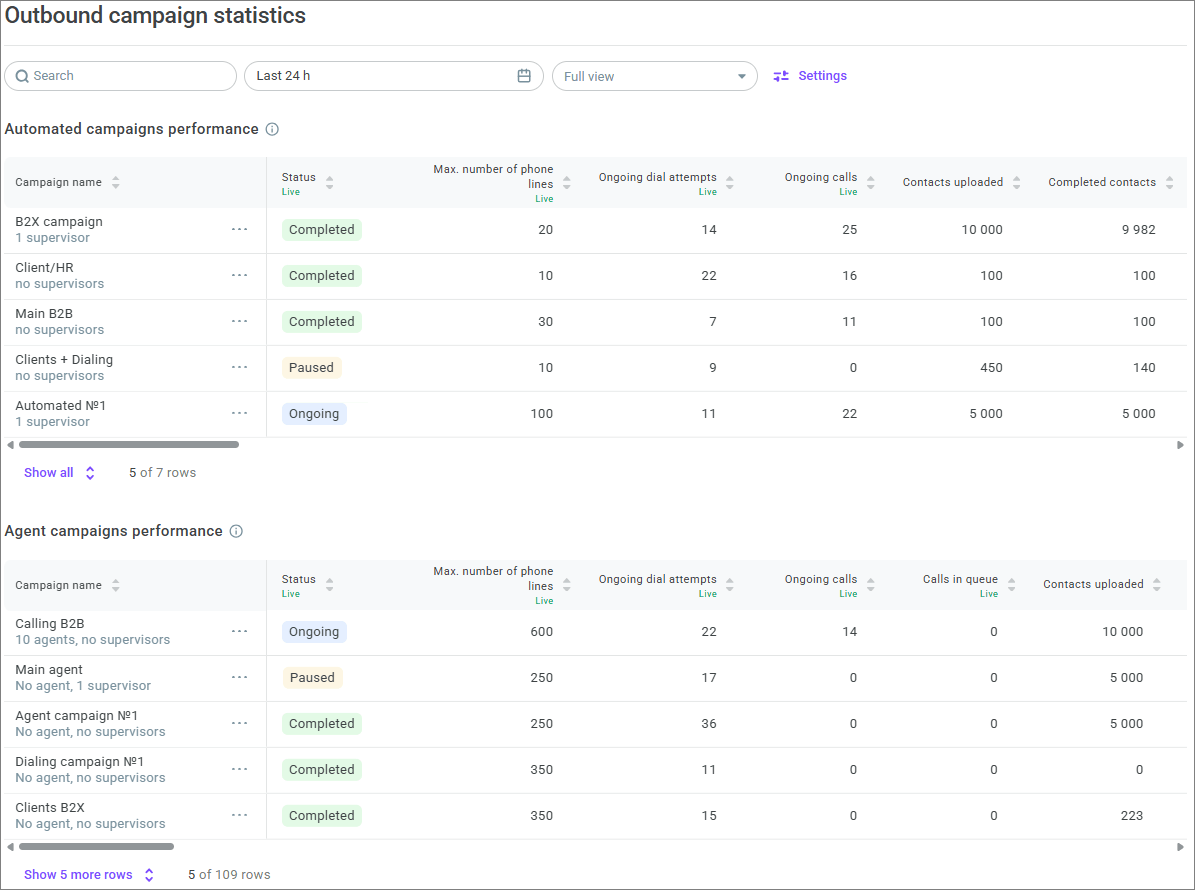
The page contains two tables:
Automated campaigns performance;
Agent campaigns performance.
The tables display campaigns in the Ongoing, Paused, and Completed statuses.
By default, campaigns are sorted by creation date: newer campaigns are displayed higher. Under the campaign name, the number of agents and supervisors is displayed. If no agents or supervisors are added, the corresponding information is displayed under the campaign name.

Each table initially displays the first 5 campaigns. To open the next 5 campaigns, click Show 5 more rows. To hide expanded campaigns, click Hide all.

Under each table, there is a counter in the X of Y rows format, where X is the number of displayed campaigns and Y is the total number of campaigns in the table.
The tables display summary information about campaigns. To view detailed metrics of a specific campaign on a dashboard, click the required campaign. For more information, see Outbound campaign dashboards ᴺᴱᵂ.
Filtering and metric period
At the top of the section, you can find:
the Search field — searches for a campaign by name;
the time period filter — selects the metric period;
the view selector — selects the set of displayed columns;
the Settings button — opens table and filter settings.

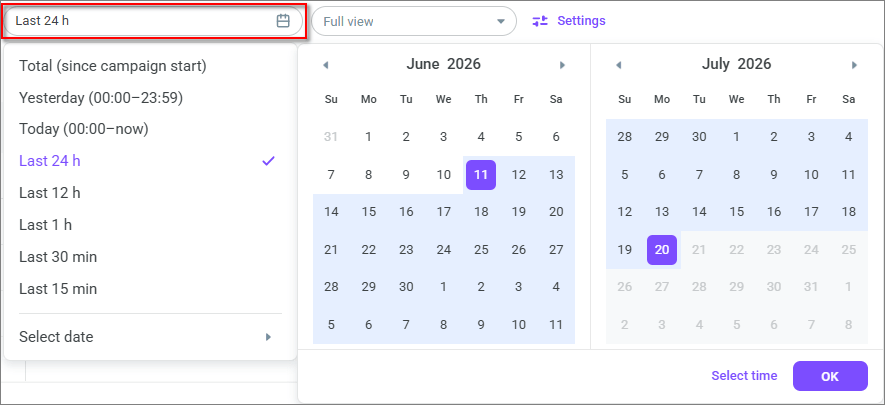
The time period filter is shared by both tables. Available options: Total (since campaign start), Yesterday (00:00–23:59), Today (00:00–now), Last 24 h, Last 12 h, Last 1 h, Last 30 min, Last 15 min, Select date.
When you select Select date, a calendar opens where you can specify a custom date and time range.
Some metrics depend on the selected period, while others are displayed independently of it.
• Contact metrics are displayed for the entire campaign period and do not depend on the selected period. They are updated every 15 seconds.
• Current campaign state metrics do not depend on the selected period, have the Live label, and are updated every 3 seconds.
• Call attempt metrics are displayed for the selected period and are updated every 15 seconds.
Percentage values in metrics are rounded to hundredths using standard mathematical rounding rules.
Configuring tables
Click Settings to configure statistics display.

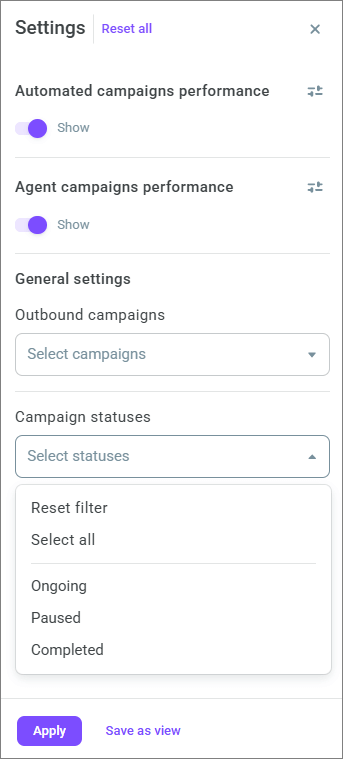
In settings, you can:
show or hide the Automated campaigns performance table;
show or hide the Agent campaigns performance table;
filter campaigns by name;
filter campaigns by statuses;
save selected settings as a view;
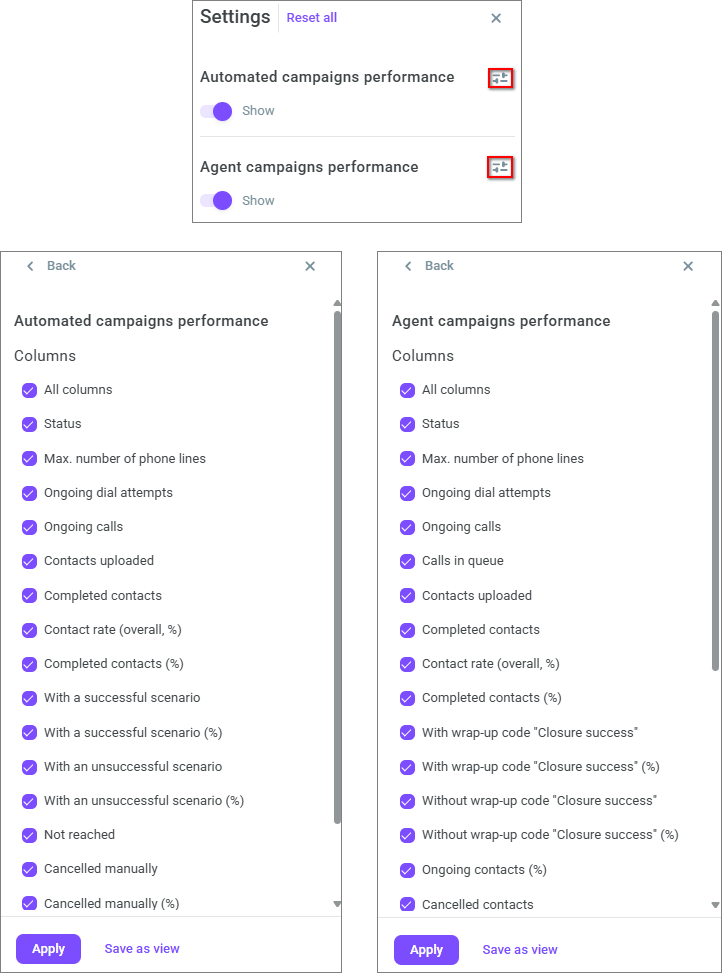
configure the column set separately for each table.
Campaign actions
Each campaign has an Actions menu.
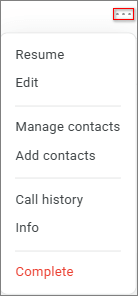
To view detailed metrics of a specific campaign, click the required campaign. For more information, see Outbound campaign dashboards ᴺᴱᵂ.
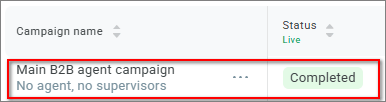
The set of actions depends on the campaign status.
Campaign status | Available actions |
Ongoing | Pause, Edit, Manage agents for agent campaigns, Manage contacts, Add contacts, Call history, Info, Complete |
Paused | Resume, Edit, Manage agents for agent campaigns, Manage contacts, Add contacts, Call history, Info, Complete |
Completed | View, Manage contacts, Call history, Info, Delete |
When you select Pause, the campaign is paused and moves to the Paused status.
When you select Resume, the paused campaign resumes and moves to the Ongoing status.
When you select Edit, the campaign settings open.
When you select View, the completed campaign settings page opens. You cannot edit the settings on this page.
When you select Manage agents, the agent management window opens for the selected agent campaign. In this window, you can add or remove campaign agents. For more information, see Agent campaigns ᴺᴱᵂ.
When you select Manage contacts, the campaign editing page opens on the Contacts tab. On this tab, you can view contact lists and manage them. For more information, see Contact lists and campaign launch ᴺᴱᵂ.
When you select Add contacts, the file upload window for contacts opens. For more information, see Uploading contacts ᴺᴱᵂ.
When you select Call history, the History > Calls section opens with a preset filter for the selected campaign.
When you select Info, the side panel with campaign information opens.
When you select Complete, a confirmation window opens. After confirmation, the campaign moves to the Completed status.
When you select Delete, a confirmation window opens. You can delete only a campaign in the Completed status. After confirmation, the campaign is deleted and cannot be restored.
Campaign info
To open the side panel with campaign information, in the Actions menu, select Info.
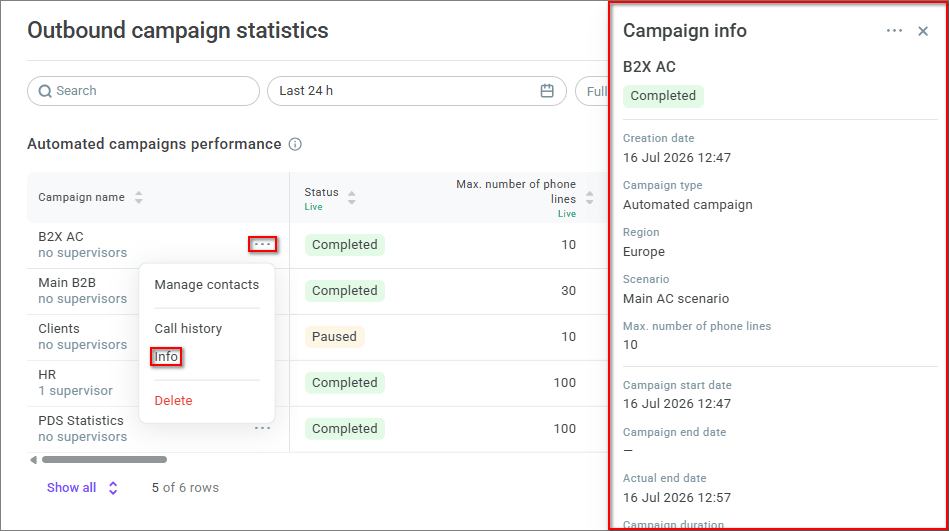
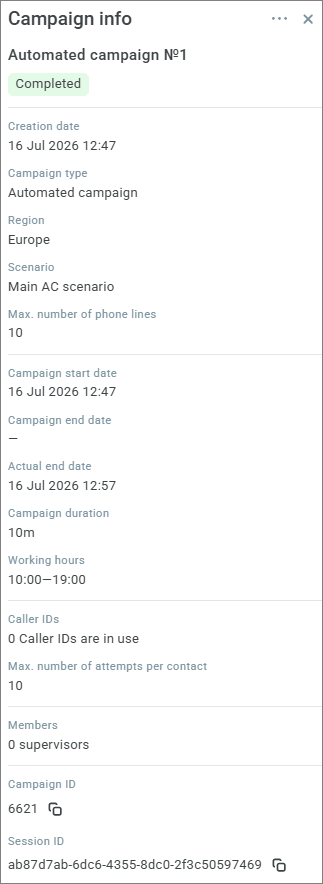
The automated campaign side panel displays the main campaign settings, members, Campaign ID, and Session ID.
The agent campaign side panel also displays the dialing mode.
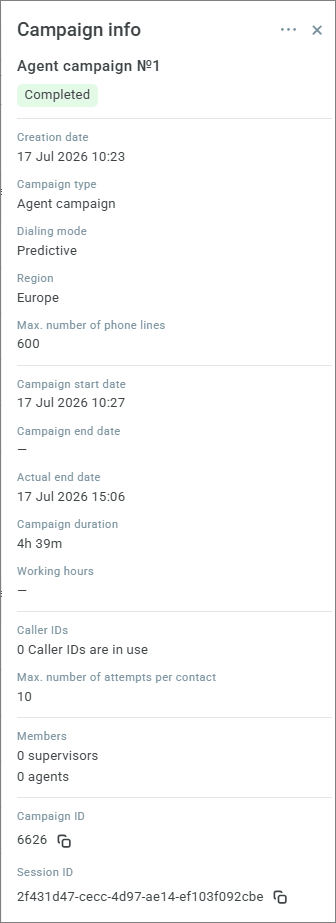
If a campaign end date is specified when creating a campaign, it is displayed in the Campaign end date field. If the end date is not specified, a dash is displayed in the field.
The Actual end date field is filled in after the campaign is completed. It shows when the campaign was actually completed: automatically on the specified campaign end date or manually using the Complete button.
Campaign duration is displayed in days, hours, and minutes; for incomplete campaigns, it is calculated from the start time to the current moment, and if less than 1 minute has passed, 0m is displayed.
The Spent field shows current campaign expenses in the account currency. The field is displayed only to users with the Administrator and Owner roles.
Copy icons are available next to Campaign ID and Session ID. Click the icon to copy the value to the clipboard.
Automated campaigns performance
The Automated campaigns performance table shows automated campaign performance: how many contacts are uploaded, how many contacts are completed, how many call attempts are ongoing or completed, how many calls were answered, and what the conversation time is.
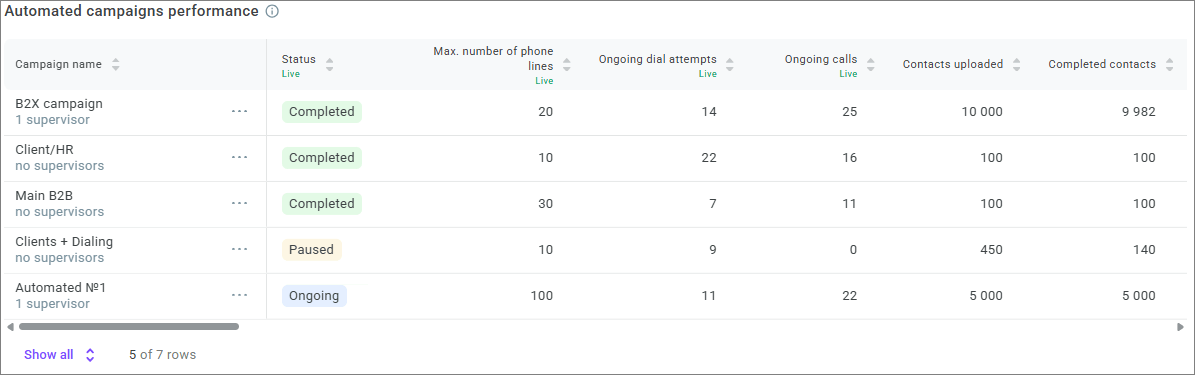
Wrap-up code data is collected only for campaigns with scenarios created by the Professional Services Voximplant team. In other campaigns, the corresponding columns display a dash.
Current campaign state metrics
This block displays current campaign state metrics that do not depend on the selected period.
Metric | Description |
Status | Current campaign status. |
Max. number of phone lines | Maximum number of campaign phone lines. |
Ongoing dial attempts | Number of dial attempts ongoing at the current moment. Does not include Ongoing calls. |
Ongoing calls | Number of active conversations at the current moment. |
Contact metrics
Contact metrics are displayed from the campaign start and do not depend on the selected period.
Metric | Description |
Contacts uploaded | Number of contacts from contact lists sent to dialing. Contact lists in the Draft status are not included. |
Completed contacts | Number of contacts for which dialing is completed. |
Completed contacts (%) | Share of completed contacts out of all uploaded contacts. Formula: Completed contacts / Contacts uploaded. |
With wrap-up code "Closure success" | Number of contacts excluded from dialing with the Closure success wrap-up code. |
With wrap-up code "Closure success" (%) | Share of completed contacts with the Closure success wrap-up code. Formula: With wrap-up code "Closure success" / Completed contacts. |
Without wrap-up code "Closure success" | Number of contacts excluded from dialing with wrap-up codes other than Closure success. The Call back code is not included. |
Without wrap-up code "Closure success" (%) | Share of completed contacts with wrap-up codes other than Closure success. Formula: Without wrap-up code "Closure success" / Completed contacts. |
Without wrap-up code | Number of contacts excluded from dialing without a wrap-up code. |
Without wrap-up code (%) | Share of completed contacts without a wrap-up code. Formula: Without wrap-up code / Completed contacts. |
Contact rate (overall, %) | Share of completed contacts where the customer answered: with a successful or unsuccessful scenario. Formula: (With a successful scenario + With an unsuccessful scenario) / Completed contacts. |
With a successful scenario | Number of contacts excluded from dialing after the customer answered and passed the Call success block. |
With a successful scenario (%) | Share of completed contacts with a successful scenario. Formula: With a successful scenario / Completed contacts. |
With an unsuccessful scenario | Number of contacts excluded from dialing after the customer answered but did not pass the Call success block. |
With an unsuccessful scenario (%) | Share of completed contacts with an unsuccessful scenario. Formula: With an unsuccessful scenario / Completed contacts. |
Not reached | Number of contacts for which call attempts ended without the customer answering. |
Not reached (%) | Share of completed contacts for which call attempts ended without the customer answering. Formula: Not reached / Completed contacts. |
Scheduled contacts | Number of contacts for which no call attempts have been made yet. |
Scheduled contacts (%) | Share of scheduled contacts out of all uploaded contacts. Formula: Scheduled contacts / Contacts uploaded. |
Ongoing contacts | Number of contacts for which a retry is scheduled after an unsuccessful attempt or after an attempt with the Voicemail or Call back wrap-up code. |
Ongoing contacts (%) | Share of ongoing contacts out of all uploaded contacts. Formula: Ongoing contacts / Contacts uploaded. |
Cancelled contacts | Number of contacts cancelled manually through the interface or API, and contacts blocked by the DNC list. |
Cancelled contacts (%) | Share of cancelled contacts out of all uploaded contacts. Formula: Cancelled contacts / Contacts uploaded. |
Cancelled manually | Number of contacts cancelled manually through the interface or API. |
Cancelled manually (%) | Share of manually cancelled contacts out of all cancelled contacts. Formula: Cancelled manually / Cancelled contacts. |
Blocked by DNC | Number of contacts blocked by the DNC list. |
Blocked by DNC (%) | Share of contacts blocked by the DNC list out of all cancelled contacts. Formula: Blocked by DNC / Cancelled contacts. |
If no wrap-up codes set is selected for the campaign, then the With wrap-up code "Closure success", Without wrap-up code "Closure success", and Without wrap-up code columns display a dash. If a set is selected, these columns are filled in, and the With a successful scenario and With an unsuccessful scenario columns display a dash.
Call attempt metrics
Metrics in this block are displayed for the selected period. Attempts completed within the selected range are included in the period.
Metric | Description |
Completed call attempts | Number of completed call attempts. |
Reached | Number of calls answered by customers, with a successful or unsuccessful scenario. |
Reached (%) | Share of calls answered by customers out of completed call attempts. Formula: Reached / Completed call attempts. |
With wrap-up code "Closure success" | Number of answered calls with the Closure success wrap-up code. |
With wrap-up code "Closure success" (%) | Share of answered calls with the Closure success wrap-up code. Formula: With wrap-up code "Closure success" / Reached. |
Without wrap-up code "Closure success" | Number of answered calls with wrap-up codes other than Closure success, including Call back. |
Without wrap-up code "Closure success" (%) | Share of answered calls with wrap-up codes other than Closure success, including Call back. Formula: Without wrap-up code "Closure success" / Reached. |
Without wrap-up code | Number of answered calls without a wrap-up code. |
Without wrap-up code (%) | Share of answered calls without a wrap-up code. Formula: Without wrap-up code / Reached. |
With a successful scenario | Number of answered calls that passed the Call success block in the scenario. |
With a successful scenario (%) | Share of answered calls with a successful scenario. Formula: With a successful scenario / Reached. |
With an unsuccessful scenario | Number of answered calls that did not pass the Call success block in the scenario. |
With an unsuccessful scenario (%) | Share of answered calls with an unsuccessful scenario. Formula: With an unsuccessful scenario / Reached. |
Not reached | Number of calls that customers did not answer. |
Not reached (%) | Share of calls not answered by customers out of completed call attempts. Formula: Not reached / Completed call attempts. |
If no wrap-up codes set is selected for the campaign, then the With wrap-up code "Closure success", Without wrap-up code "Closure success", and Without wrap-up code columns display a dash. If a set is selected, these columns are filled in, and the With a successful scenario and With an unsuccessful scenario columns display a dash.
Conversation time metrics
Conversation time metrics are displayed for the selected period.
Conversation time is calculated from the moment the subscriber or voice assistant answers until the call ends: when the subscriber hangs up, the scenario ends, or voicemail is detected.
Metric | Description |
Total conversations time | Total time of completed conversations for the selected period. |
Min. conversations time | Minimum conversation time for the selected period. |
Avg. conversation time | Average conversation time for the selected period. Formula: Total conversations time / number of completed conversations. |
Max. conversation time | Maximum conversation time for the selected period. |
Agent campaigns performance
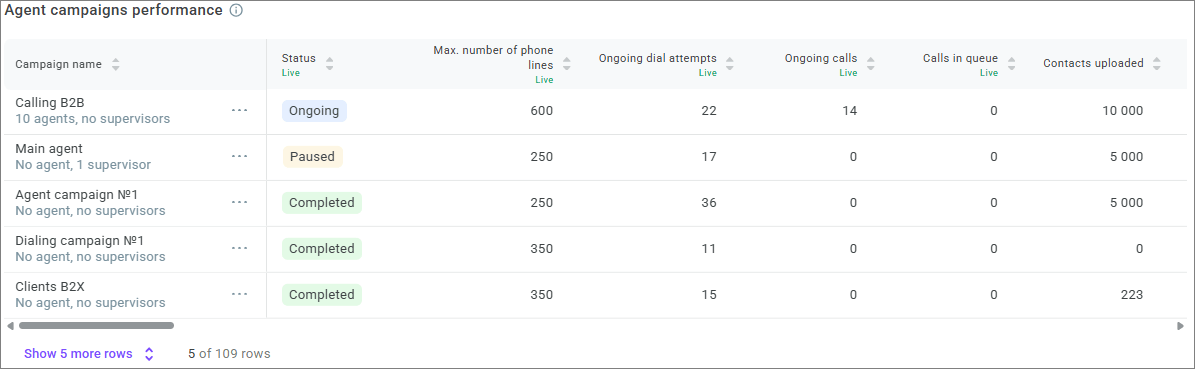
The Agent campaigns performance table shows agent campaign performance: how many contacts are uploaded and completed, how many calls agents are processing, how many call attempts are completed, how many calls were lost, how long customers waited for an agent response, and how many agents are busy.
Current campaign state metrics
This block displays current campaign state metrics that do not depend on the selected period.
Metric | Description |
Status | Current campaign status. |
Max. number of phone lines | Maximum number of campaign phone lines. |
Ongoing dial attempts | Number of dial attempts ongoing at the current moment. Does not include Ongoing calls. |
Ongoing calls | Number of calls currently processed by agents, including service and post-processing. |
Calls in queue | Number of calls where the customer answered and is waiting to be distributed to an agent. |
Busy agents | Number of agents in the Dialing, In service, and Afterservice statuses. |
Available agents | Number of agents in the Ready status. |
Unavailable agents | Number of agents in the Online, Offline, DND, and Banned statuses. |
Contact metrics
Contact metrics are displayed from the campaign start and do not depend on the selected period.
Metric | Description |
Contacts uploaded | Number of contacts from contact lists sent to dialing. Contact lists in the Draft status are not included. |
Completed contacts | Number of contacts for which dialing is completed. |
Completed contacts (%) | Share of completed contacts out of all uploaded contacts. Formula: Completed contacts / Contacts uploaded. |
Contact rate (overall, %) | Share of completed contacts where the customer answered: with the Closure success wrap-up code or without this wrap-up code. Formula: (With wrap-up code "Closure success" + Without wrap-up code "Closure success") / Completed contacts. |
With wrap-up code "Closure success" | Number of contacts excluded from dialing with the Closure success wrap-up code. |
With wrap-up code "Closure success" (%) | Share of completed contacts with the Closure success wrap-up code. Formula: With wrap-up code "Closure success" / Completed contacts. |
Without wrap-up code "Closure success" | Number of contacts excluded from dialing with wrap-up codes other than Closure success. The Call back code is not included. |
Without wrap-up code "Closure success" (%) | Share of completed contacts with wrap-up codes other than Closure success. Formula: Without wrap-up code "Closure success" / Completed contacts. |
Without wrap-up code | Number of contacts excluded from dialing without a wrap-up code. |
Without wrap-up code (%) | Share of completed contacts without a wrap-up code. Formula: Without wrap-up code / Completed contacts. |
Not reached | Number of contacts for which call attempts ended without the customer answering. Does not include attempts with the Call answered, Abandoned, and Missed by agent results. |
Not reached (%) | Share of completed contacts for which call attempts ended without the customer answering. Formula: Not reached / Completed contacts. |
Scheduled contacts | Number of contacts for which no call attempts have been made yet. |
Scheduled contacts (%) | Share of scheduled contacts out of all uploaded contacts. Formula: Scheduled contacts / Contacts uploaded. |
Ongoing contacts | Number of contacts for which a retry is scheduled after an unsuccessful attempt or after an attempt with the Voicemail or Call back wrap-up code. |
Ongoing contacts (%) | Share of ongoing contacts out of all uploaded contacts. Formula: Ongoing contacts / Contacts uploaded. |
Cancelled contacts | Number of contacts cancelled manually through the interface or API, and contacts blocked by the DNC list. |
Cancelled contacts (%) | Share of cancelled contacts out of all uploaded contacts. Formula: Cancelled contacts / Contacts uploaded. |
Cancelled manually | Number of contacts cancelled manually through the interface or API. |
Cancelled manually (%) | Share of manually cancelled contacts out of all cancelled contacts. Formula: Cancelled manually / Cancelled contacts. |
Blocked by DNC | Number of contacts blocked by the DNC list. |
Blocked by DNC (%) | Share of contacts blocked by the DNC list out of all cancelled contacts. Formula: Blocked by DNC / Cancelled contacts. |
Call attempt metrics
Metrics in this block are displayed for the selected period. For successful attempts, post-processing completion is included in the period if post-processing occurred. For unsuccessful attempts, call completion is included in the period.
Metric | Description |
Completed call attempts | Number of completed call attempts. |
Reached | Number of calls answered by customers where connection with an agent occurred. |
Reached (%) | Share of calls answered by customers where connection with an agent occurred. Formula: Reached / Completed call attempts. |
With wrap-up code "Closure success" | Number of answered calls with the Closure success wrap-up code. |
With wrap-up code "Closure success" (%) | Share of answered calls with the Closure success wrap-up code. Formula: With wrap-up code "Closure success" / Reached. |
Without wrap-up code "Closure success" | Number of answered calls with wrap-up codes other than Closure success, including Call back. |
Without wrap-up code "Closure success" (%) | Share of answered calls with wrap-up codes other than Closure success, including Call back. Formula: Without wrap-up code "Closure success" / Reached. |
Without wrap-up code | Number of answered calls without a wrap-up code. |
Without wrap-up code (%) | Share of answered calls without a wrap-up code. Formula: Without wrap-up code / Reached. |
Not reached | Number of calls that customers did not answer. Does not include calls with the Call answered, Abandoned, and Missed by agent results. |
Not reached (%) | Share of calls not answered by customers out of completed call attempts. Formula: Not reached / Completed call attempts. |
Lost calls | Number of calls answered by customers where customers hung up before the call was distributed to a queue, or after the call was distributed to a queue but before an agent answered. Includes cases where the agent did not answer. This metric includes calls with the Abandoned and Missed by agent attempt results. |
Lost calls (%) | Share of lost calls out of completed call attempts. Percentage shows the ratio to the Completed call attempts metric. |
Abandoned calls | Number of calls answered by customers where customers hung up before being connected to an agent. Includes calls with the Abandoned attempt result. |
Abandoned calls (%) | Share of abandoned calls out of lost calls. Formula: Abandoned calls / Lost calls. |
Missed calls | Number of calls answered by customers that were distributed to a queue and assigned to an agent, but the agent did not answer. Includes calls with the Missed by agent attempt result. |
Missed calls (%) | Share of missed calls out of lost calls. Formula: Missed calls / Lost calls. |
Agent response waiting time metrics
Agent response waiting time metrics are displayed for the selected period. Post-processing completion is included in the period for successful attempts.
Metric | Description |
Min. waiting time for agent response | Minimum time from when the customer answered to when an agent answered for the selected period. |
Avg. waiting time for agent response | Average time from when the customer answered to when an agent answered for the selected period. Formula: total waiting time / Reached. |
Max. waiting time for agent response | Maximum time from when the customer answered to when an agent answered for the selected period. |
Conversation time metrics
Conversation time metrics are displayed for the selected period.
Conversation time is calculated from the moment the subscriber or voice assistant answers until the call ends: when the subscriber hangs up, the scenario ends, or voicemail is detected.
Metric | Description |
Total conversations time | Total time of completed conversations for the selected period. |
Min. conversations time | Minimum conversation time for the selected period. |
Avg. conversation time | Average conversation time for the selected period. Formula: Total conversations time / number of completed conversations. |
Max. conversation time | Maximum conversation time for the selected period. |